Running Local AI in the 2026 RAM Shortage: Free Settings Worth Hundreds of Dollars of Memory
A 64 GB DDR5 kit went from about $222 to over $1,000 in a year. Before you buy RAM for local AI, put a price on your settings: context length, quantization and GPU offload can free gigabytes for free. The maths, a ranked list of tweaks, and when upgrading still makes sense.
Awareness · 9 min
Running Local AI in the 2026 RAM Shortage
A 64 GB DDR5 kit went from about $222 to over $1,000 in a year. Before you buy RAM for local AI, put a price on your settings: context length, quantization and GPU offload can free gigabytes for free. The maths, a ranked list of tweaks, and when upgrading still makes sense.
Definition
A local model’s memory use has three parts: the model’s weights (set by its size and quantization), the KV cache (set by how much text it remembers—the context length), and overhead for your operating system and apps. Only the first is fixed when you pick a model; the other two are settings you control.
If you priced memory recently, you already know: AI data centres are buying it faster than factories can make it. A 64 GB DDR5 kit that cost around $222 in October 2025 sold for roughly $1,100–$1,270 by September 2026. Laptops from big brands went up 15–30%.
For people running AI locally, that hurts—memory is the thing local models need most. But a lot of the memory a local model uses is set by settings, not by the model.
So here’s a different way to think about it: at today’s prices, each gigabyte of RAM costs about $17–22. Let’s put a dollar value on the settings you can change for free.
What happened to RAM prices
Retail DDR5 prices reported in late 2026.
| Item | Oct 2025 | Sep 2026 |
|---|---|---|
| 64 GB DDR5 kit | ≈ $222 | ≈ $1,099–$1,272 |
| 32 GB DDR5 kit | — | ≈ $350+ |
| Price per GB | ≈ $3.50 | ≈ $17–22 |
Manufacturers have shifted production toward the high-bandwidth memory used in AI accelerators, and new capacity takes years to build. Some analysts expect relief in 2027, but nothing published calls a bottom before then.
Where your model’s memory actually goes
Take a popular 8B model as an example. Its memory use is roughly:
Rough memory for a local model
total ≈ weights + KV cache + overhead

weights   ≈ parameters × bits per weight ÷ 8
KV cache  ≈ context length × per-token cache size
overhead  ≈ 0.5–1 GB for the engine, plus your OS and apps
For a Llama-3-style 8B model, the KV cache takes about 128 KB per token at standard precision. That sounds tiny until you multiply it: 8,000 tokens is about 1 GB, and 32,000 tokens is about 4 GB—on top of the model itself.
note
The surprise for most people
A long context window can cost as much memory as the model. If you set 32K “just in case” but your chats are short, you’re reserving gigabytes you never use.
Your settings, priced in RAM
Here are the biggest free tweaks for a typical 8B model, with the memory they free and what that memory would cost to buy at around $17–22 per GB. Figures are approximate.
Free tweaks, ranked by memory saved (8B model example).
| Tweak | Memory freed | Equivalent RAM cost | Trade-off |
|---|---|---|---|
| Context 32K → 8K | ≈ 3 GB | ≈ $50–67 | Remembers less of very long chats or files |
| Q8_0 → Q4_K_M quantization | ≈ 3.5 GB | ≈ $60–80 | Small quality drop; noticeable on hard coding tasks |
| Q8_0 → Q5_K_M (middle ground) | ≈ 2.8 GB | ≈ $48–63 | Keeps more quality for coding |
| Close the browser tabs you aren’t using | 1–4 GB | ≈ $17–90 | None |
| Move layers to the GPU (if you have one) | Shifts GBs from RAM to VRAM | — | Needs a GPU with spare memory |
| Smaller model (8B → 3–4B) | ≈ 2–4 GB | ≈ $35–90 | Weaker on complex tasks; great for quick ones |
Stack the first two and you’ve freed around 6 GB—more than $100 of memory at today’s prices—without spending anything. For many people, that’s the difference between “my laptop can’t run this” and “it runs fine”.
tip
Coding? Spend your memory on quality, not context
Coding is the task most sensitive to heavy quantization. If you must choose, a Q5_K_M model with an 8K context usually beats a Q4 model with a 32K context for everyday coding.
A step-by-step plan before you buy anything
- Measure first: check how much RAM is actually free with your usual apps open, not on a fresh boot.
- Right-size the context to what you really use. Most chats and single-file edits fit in 8K.
- Pick the quantization for the job: Q4_K_M for chat, Q5_K_M for coding if it fits.
- Offload layers to your GPU if you have one, even a modest one.
- Keep two models: a small fast one for quick questions and a bigger one for hard problems—only one loaded at a time.
- For rare, very hard questions, stream a big model from disk instead of buying RAM (see AirLLM below).
When buying memory still makes sense
A simple decision guide.
| Situation | Suggestion |
|---|---|
| You hit memory limits daily after the tweaks above | Buy now if you need it within a year—prices aren’t expected to fall soon |
| You’re choosing between more RAM and a better GPU | In 2026, GPU memory (VRAM) is often better value for AI than system RAM |
| You’re buying a new machine anyway | Look at unified-memory laptops and mini-PCs; their prices haven’t tracked DIMM spot prices as closely |
| You only struggle with occasional huge models | Don’t buy—use disk streaming for those rare jobs |
How Quietly helps you spend less memory
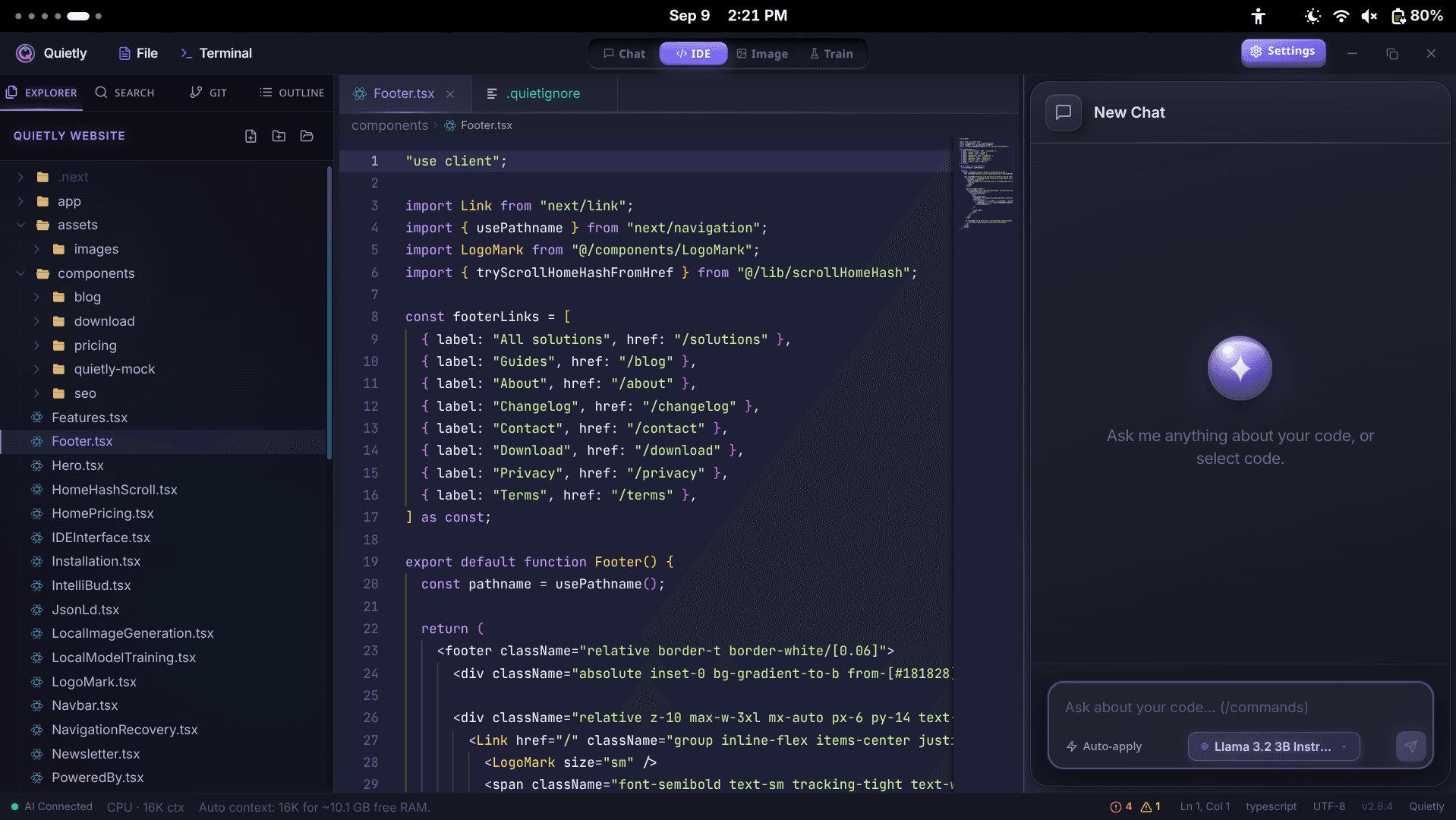
- Automatic context sizing: Quietly picks a context length that fits your free RAM and shows it in the status bar (for example, “Auto context: 16K for ~10.1 GB free RAM”).
- Device scan (Settings → Engine) reads your RAM, GPU and VRAM and recommends models that will actually fit.
- Context size, GPU layers and threads are all adjustable in Settings when you want to fine-tune.
- AirLLM streams 70B-class models from disk one layer at a time, so occasional hard questions don’t require a RAM upgrade—at the cost of speed.
- Heavy jobs take turns: image generation and training are queued one at a time and pause the chat engine, instead of all fighting for the same memory.
note
Related guides
For the basics, read “How Much RAM Do I Need to Run an LLM Locally?”. For specific picks, see “Best Local LLM for Laptops Without a GPU” and “How to Run a 70B Model on a Small GPU with AirLLM”.
Where Quietly fits
FAQ
Why is RAM so expensive in 2026?
Memory makers shifted production toward the high-bandwidth memory used in AI data centres, leaving less for consumer DDR5. A 64 GB DDR5 kit rose from about $222 in October 2025 to roughly $1,100–$1,270 by September 2026.
How can I run a local LLM with less RAM?
Lower the context length to what you actually use, choose a 4- or 5-bit quantization, offload layers to a GPU if you have one, close unused apps, and use a smaller model for quick tasks. Together these often free 5 GB or more.
How much memory does context length use?
For a Llama-3-style 8B model, about 128 KB per token at standard precision: roughly 1 GB for 8K tokens and 4 GB for 32K tokens. Larger models use more per token.
Should I buy more RAM for local AI now or wait?
Try the free tweaks first. If you still hit limits every day and need more memory within a year, buying now is reasonable, since prices aren’t expected to drop before 2027. If you’re choosing, GPU memory is often better value for AI.
Does Quietly adjust settings to my RAM automatically?
Yes. Quietly sizes the context to your free RAM automatically and its device scan recommends models that fit. You can override context size, GPU layers and threads in Settings.
Sources
Related guides
Awareness
How Much RAM Do I Need to Run an LLM Locally? (Simple 2026 Guide)
A simple, no-jargon guide to how much RAM you need to run a local LLM: the one formula to remember, a table for 8 GB to 64 GB machines, why context length eats memory, and how to check your own PC in one click.
Awareness
Best Local LLM for Laptops Without a GPU (8 GB / 16 GB RAM) — 2026 Picks
No graphics card? You can still run useful AI offline. The best local LLMs for CPU-only laptops with 8 GB or 16 GB of RAM, what speed to expect, and simple tweaks that make them faster.
Awareness
How to Run a 70B Model on a Small GPU with AirLLM (Honest 2026 Guide)
AirLLM lets 70B-class models like Llama 3.3 70B run on GPUs and PCs that could never hold them in memory. How layer streaming works, what speed and disk space to really expect, and how to set it up without the terminal.