How to Run a 70B Model on a Small GPU with AirLLM (Honest 2026 Guide)
AirLLM lets 70B-class models like Llama 3.3 70B run on GPUs and PCs that could never hold them in memory. How layer streaming works, what speed and disk space to really expect, and how to set it up without the terminal.
Awareness · 11 min
How to Run a 70B Model on a Small GPU with AirLLM (Honest…
AirLLM lets 70B-class models like Llama 3.3 70B run on GPUs and PCs that could never hold them in memory. How layer streaming works, what speed and disk space to really expect, and how to set it up without the terminal.
Definition
AirLLM is an inference technique that runs very large language models on limited hardware by loading one layer at a time from disk, computing it, and freeing the memory before the next layer. It trades speed for the ability to run 70B-class models on ordinary GPUs and PCs.
A 70B model is dramatically smarter than a 7B one—and dramatically bigger. At full precision it is around 140 GB, far beyond any consumer GPU.
AirLLM gets around that limit with a simple idea: never load the whole model. Instead, stream it through memory one layer at a time.
It works, and it is genuinely useful for some jobs. It is also slow. This guide explains exactly how slow, what you need, and when it is worth it.
How layer streaming works (in plain English)
A language model is a stack of layers—a 70B Llama has 80 of them. Normally every layer lives in GPU memory the whole time. AirLLM keeps them on your disk instead and, for each step of the answer, does this:
- Load layer 1 from disk into memory.
- Run the calculation for that layer.
- Throw it away and load layer 2.
- Repeat through all layers, then do it again for the next part of the answer.
Because only one layer is in memory at a time, the peak memory need is small. The catch is obvious: the model is read from disk over and over, so your disk speed becomes the speed limit.
Honest expectations: speed and space
AirLLM vs a normal local setup (llama.cpp with a model that fits in memory).
| AirLLM (layer streaming) | llama.cpp (model fits in memory) | |
|---|---|---|
| Largest model on a modest PC | 70B-class and beyond | Limited by your RAM/VRAM |
| Speed | Very slow — seconds per word, minutes per answer | Fast — many words per second |
| Disk space | Large — ~140–145 GB per 70B model in the catalog | Small — a few GB for 7B |
| Best for | Occasional hard questions where quality matters most | Daily chat, coding, and agents |
warning
Not for interactive coding
AirLLM is not a replacement for a normal chat model. Agent loops and fast back-and-forth need a model that fits in memory. Think of AirLLM as “ask a hard question, go make coffee, come back to a better answer.”
- Use a fast NVMe SSD. On a hard drive or slow SATA SSD, it can be painfully slow.
- Keep plenty of free space. Each 70B model in Quietly’s catalog is roughly 140–145 GB.
- An NVIDIA GPU helps a lot. Without one, AirLLM runs on the CPU, which works but is much slower.
What you need
Requirements for AirLLM inside Quietly.
| Item | Details |
|---|---|
| GPU | NVIDIA recommended (CUDA). Other GPUs and Macs run on the CPU. |
| Disk | Fast NVMe SSD with ~150 GB free per 70B model |
| Python | Handled for you — Quietly creates a private Python environment (and downloads a portable Python if yours is missing) |
| One-time download | PyTorch and AirLLM libraries; the CUDA build is often 2–4 GB |
| Hugging Face account | Only for gated models like Llama — add your access token in Settings |
note
Apple Silicon
Quietly’s AirLLM setup runs on the CPU on Macs rather than using the Apple GPU. For Macs with lots of unified memory, a large GGUF model in llama.cpp is usually the faster choice.
Setting up AirLLM in Quietly (no terminal)
Doing this by hand normally means creating a Python environment, installing matching versions of PyTorch and AirLLM, and writing a script. Quietly wraps all of it:
- Open Settings → Engine and choose AirLLM as the AI backend.
- Click “Install AirLLM deps.” Quietly builds a private Python environment and installs pinned, tested versions. On a slow connection the NVIDIA build can take 15–45 minutes.
- For gated models (such as Llama), paste your Hugging Face access token into the “Hugging Face access token” field.
- Go to Models and pick an AirLLM model—for example Llama 3.3 70B, Llama 3.1 70B, DeepSeek R1 Distill Llama 70B, or Qwen 2.5 72B.
- Start chatting. The first load can take several minutes while layers are prepared.
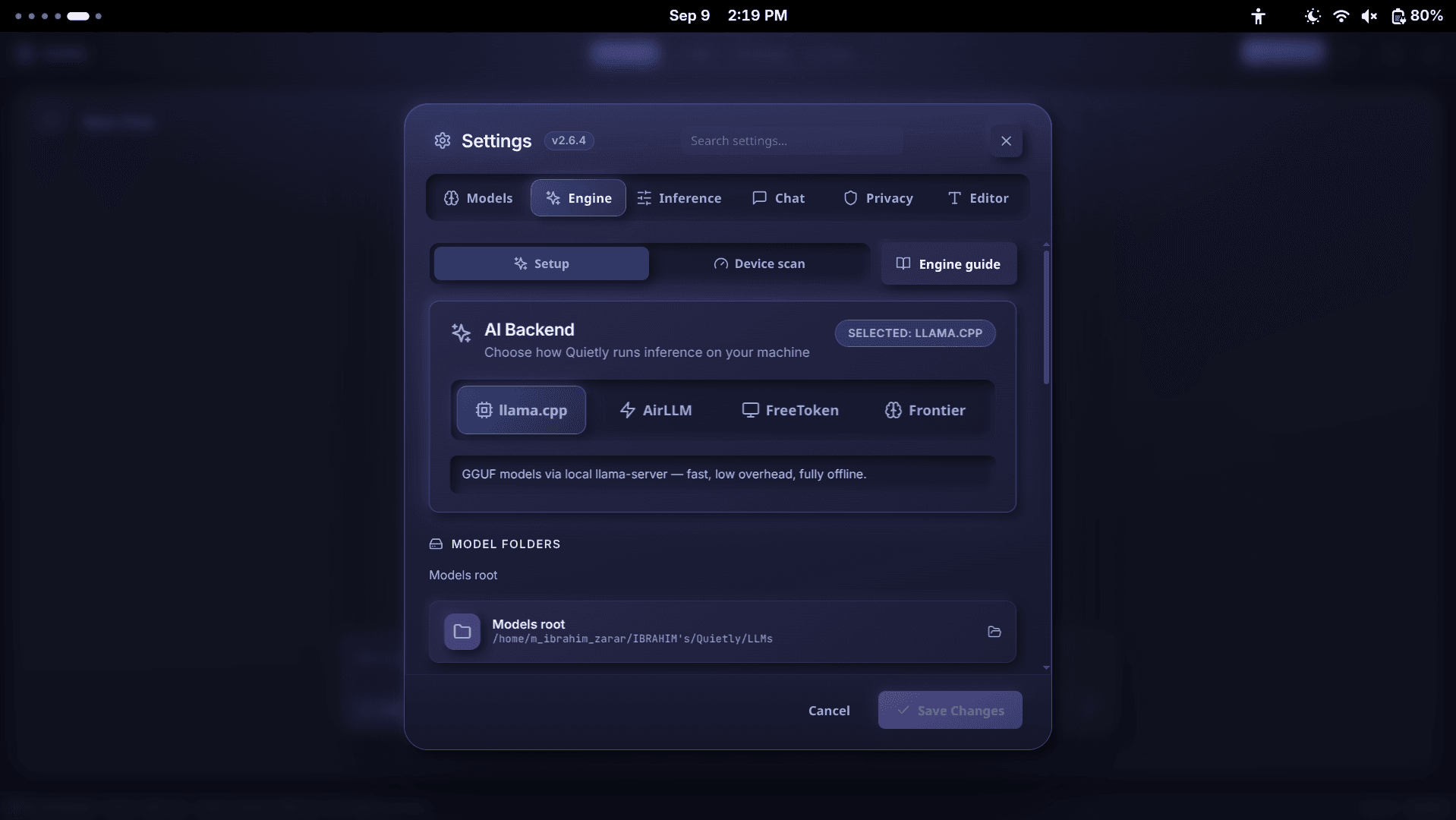
Already downloaded a model from Hugging Face? Use Models → Import Model → AirLLM and point to the folder. It needs the model’s config.json and .safetensors files.
Settings worth knowing
AirLLM options in Quietly.
| Setting | Default | What it does |
|---|---|---|
| Quantization | 4-bit | Compresses layers as they load to reduce memory; 8-bit is higher quality but heavier |
| Context length | 4,096 | Adjustable from 512 to 8,192; longer context is slower |
tip
Get more from each answer
Because each word is expensive, write one detailed prompt and ask for a concise answer. “Review this function for bugs and list the top three, one line each” works much better than a long back-and-forth.
When AirLLM is worth it (and when it isn’t)
A quick decision guide.
| Good use of AirLLM | Better with a normal model |
|---|---|
| Second opinion on a tricky bug or design | Everyday coding and autocomplete |
| Reviewing an important document offline | Chatting back and forth |
| Testing how a 70B model answers vs your 7B | Agent mode that edits files |
| Overnight batch questions | Anything you need in seconds |

FAQ
Can I really run a 70B model on a small GPU?
Yes, with layer streaming. AirLLM loads one layer at a time, so peak memory stays small. The trade-off is speed: expect seconds per word and minutes per answer, and around 140 GB of disk space per 70B model.
How fast is AirLLM?
Much slower than a model that fits in memory. Speed depends mostly on your disk and GPU; a fast NVMe SSD and an NVIDIA card help a lot. It is best for occasional hard questions, not interactive chat.
Does AirLLM work on Mac or AMD GPUs?
In Quietly, AirLLM uses CUDA on NVIDIA GPUs and runs on the CPU everywhere else, including Macs and AMD cards. It works, but it is slower. On Macs, a large GGUF model in llama.cpp is often the better option.
Do I need to know Python to use AirLLM?
Not with Quietly. Clicking “Install AirLLM deps” in Settings → Engine creates a private Python environment with tested versions of PyTorch and AirLLM. You pick a model and chat.
Which 70B models can I run?
Quietly’s AirLLM catalog includes Llama 3.3 70B, Llama 3.1 70B, DeepSeek R1 Distill Llama 70B, Qwen 2.5 72B, and Qwen 2.5 VL 72B. You can also import other Hugging Face models that have config.json and safetensors files.
Related guides
Awareness
How Much RAM Do I Need to Run an LLM Locally? (Simple 2026 Guide)
A simple, no-jargon guide to how much RAM you need to run a local LLM: the one formula to remember, a table for 8 GB to 64 GB machines, why context length eats memory, and how to check your own PC in one click.
Awareness
Best Local LLM for Laptops Without a GPU (8 GB / 16 GB RAM) — 2026 Picks
No graphics card? You can still run useful AI offline. The best local LLMs for CPU-only laptops with 8 GB or 16 GB of RAM, what speed to expect, and simple tweaks that make them faster.
Awareness
How to Fine-Tune a Local LLM on Your Own Code (No Cloud, 2026)
Teach a local model your team’s code style, APIs, and conventions without uploading a single file. A beginner-friendly guide to LoRA fine-tuning on your own machine: when it’s worth it, how to build the dataset, and how to use the result.