Offline AI Image Generation on Your PC: SDXL vs FLUX vs Sana (2026)
Generate AI images on your own computer with no internet, no credits, and no uploads. SDXL, FLUX.1 schnell, and SANA compared in plain English—what hardware each needs and which one to pick.
Comparison · 10 min
Offline AI Image Generation on Your PC
Generate AI images on your own computer with no internet, no credits, and no uploads. SDXL, FLUX.1 schnell, and SANA compared in plain English—what hardware each needs and which one to pick.
Definition
Offline AI image generation means running a text-to-image model such as SDXL, FLUX, or SANA directly on your own PC. Your prompts and images never leave the computer, there are no credits or subscriptions, and it works without internet once the model is downloaded.
Online image generators are fun until you hit the limits: credits run out, prompts get logged, and your images live on someone else’s server.
Running the model yourself fixes all of that. The question is which model, and whether your computer can handle it.
This guide compares the three model families most people choose between in 2026—SDXL, FLUX, and SANA—and shows the simplest way to run them without installing Python tools by hand.
Why generate images offline?
- Privacy: product mockups, client concepts, and personal photos never get uploaded.
- No credits: generate as many images as you like—your only cost is electricity.
- No queues or outages: speed depends only on your hardware.
- Keep everything: every image is saved on your disk with its settings, so you can recreate it later.
The three models, explained simply
SDXL is the reliable veteran. It is small enough to run on almost anything—including CPU-only machines and Macs—and produces good images, especially with a descriptive prompt.
FLUX.1 schnell is the quality leader for local use. It follows prompts closely, handles text in images much better than SDXL, and needs only about four steps per image. It is also big and wants a strong GPU.
SANA, from NVIDIA research, is built for efficiency. It creates high-resolution images quickly on mid-range NVIDIA cards and is a great middle ground between SDXL and FLUX.
The four image models available in Quietly.
| Model | Download | Hardware needed | Strengths |
|---|---|---|---|
| SDXL 1.0 (GGUF Q4) | ~3.9 GB | ~6 GB; NVIDIA, AMD, Intel, Apple, or CPU | Runs anywhere, no Python needed |
| SANA 0.6B | ~6 GB | NVIDIA GPU with ~8 GB | Fast, sharp, efficient |
| SANA 1.6B | ~11 GB | NVIDIA GPU with ~12 GB | Better detail than 0.6B |
| FLUX.1 schnell | ~24 GB | NVIDIA ~10 GB+ VRAM, or ~24 GB RAM without CUDA | Best prompt-following and text |
Which one should you pick?
Quick recommendation based on your hardware.
| Your machine | Best choice | Why |
|---|---|---|
| NVIDIA GPU with 16 GB+ VRAM | FLUX.1 schnell | Top quality at good speed |
| NVIDIA GPU with 8–12 GB VRAM | SANA (0.6B or 1.6B) | Great quality that fits your card |
| AMD / Intel GPU | SDXL | Runs on Vulkan |
| Apple Silicon Mac | SDXL (FLUX if you have 24 GB+) | SDXL uses Metal; FLUX is heavy on a Mac |
| No GPU | SDXL | Slow on CPU, but it works |
tip
Not sure? Quietly suggests one
Quietly’s Image view checks your hardware and recommends a model—FLUX for big NVIDIA cards or high-memory Macs, SANA for 8–12 GB NVIDIA cards, and SDXL for everything else.
Generating your first image in Quietly
Setting up local image generation usually means installing Python, the right PyTorch build, and a web UI with dozens of options. Quietly packages it into one screen:
- Open the Image view and follow the one-time setup for the model you choose. SDXL needs no Python at all; FLUX and SANA get a private Python environment that Quietly creates for you.
- Type a description of what you want.
- Choose a shape: Square (512×512), Portrait (512×768), Landscape (768×512), or Custom (256 to 2048 pixels).
- Click Create (or press Ctrl+Enter).
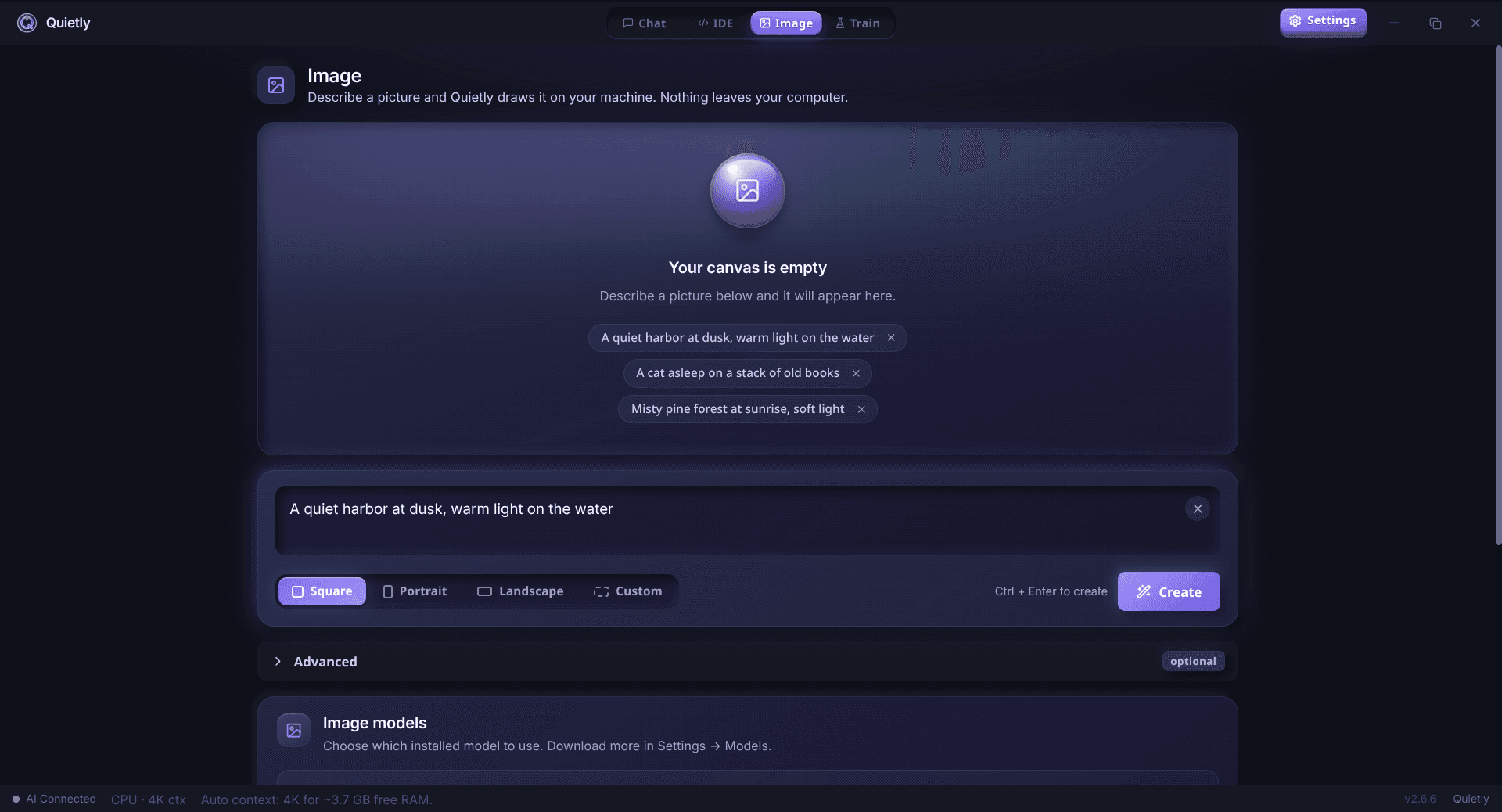
Want more control? Open the advanced options:
Advanced options, in plain language.
| Option | What it does |
|---|---|
| Things to avoid | A negative prompt—list what you don’t want (e.g. “blurry, extra fingers”) |
| Detail passes | Number of steps (1–40). More passes add detail but take longer; FLUX needs only ~4 |
| Prompt strength | How strictly the model follows your words |
| Repeat the same result | Reuse a seed to recreate or slightly tweak an image |
| Start from an existing image | Image-to-image: restyle or vary a picture (FLUX and SDXL) |
| Image influence | How much the starting image shapes the result |
Make images straight from the chat
You don’t have to leave the conversation. In Quietly’s chat, type /image followed by a description—for example “/image a watercolor map of a small coastal town”—and the image appears in the chat.
note
One heavy job at a time
Image models and chat models both need lots of memory. Quietly pauses the chat model while an image is being generated so your computer doesn’t run out of memory.
Where images go, and safety
- Every image is saved as a PNG in your models folder under Image/outputs, alongside a small .json file with the prompt and settings, so you can recreate it later.
- Nothing is uploaded—not the prompt, not the image.
- A built-in safety filter is always on. It checks prompts, adds a safety negative prompt, and screens results with a local classifier to block explicit content.
warning
What’s not included
Quietly focuses on fast, simple generation. It does not currently do inpainting (editing a masked region), and SANA does not support image-to-image. For those, use SDXL or FLUX with “Start from an existing image.”
FAQ
Can I generate AI images offline on my PC?
Yes. Models like SDXL, FLUX.1 schnell, and SANA run entirely on your computer. Once downloaded, they work without internet, and your prompts and images never leave your machine.
Is FLUX better than SDXL?
Usually, yes—FLUX follows prompts more closely and handles text in images much better. But it is about 24 GB and wants an NVIDIA GPU with 10 GB+ VRAM. SDXL is smaller and runs on almost any hardware.
What is SANA?
SANA is an efficient text-to-image model from NVIDIA research. The 0.6B version needs an NVIDIA GPU with around 8 GB of VRAM and makes sharp images quickly; the 1.6B version needs around 12 GB.
Can I generate AI images without a GPU?
Yes, with SDXL. It runs on the CPU—slowly, but it works. FLUX can also fall back to the CPU if you have around 24 GB of RAM, though it will be very slow.
Does offline image generation work on a Mac?
Yes. SDXL runs on Apple Silicon using Metal. FLUX is recommended only on Macs with 24 GB or more of memory. SANA requires an NVIDIA GPU, so it isn’t available on Macs.
Related guides
Comparison
The Offline Cursor & GitHub Copilot Alternative: A Private AI IDE (2026)
Want Cursor- or Copilot-style AI coding without sending your code to the cloud? An honest look at what a private, offline AI IDE can do in 2026, where it still trails, and how Quietly fills the gap.
Comparison
Top 5 Local AI Coding Tools You Can Run Offline (2026 Edition)
A practical shortlist for privacy-first developers: compare RAM needs, latency, and offline guarantees for popular local AI coding workflows (including Quietly).
Comparison
LM Studio vs Ollama vs Quietly (2026): Which Local AI Tool Should You Use?
A plain-English comparison of LM Studio, Ollama, and Quietly in 2026: what each one is really for, who should pick which, and why many people end up using more than one.