How to Fine-Tune a Local LLM on Your Own Code (No Cloud, 2026)
Teach a local model your team’s code style, APIs, and conventions without uploading a single file. A beginner-friendly guide to LoRA fine-tuning on your own machine: when it’s worth it, how to build the dataset, and how to use the result.
Awareness · 12 min
How to Fine-Tune a Local LLM on Your Own Code (No Cloud,…
Teach a local model your team’s code style, APIs, and conventions without uploading a single file. A beginner-friendly guide to LoRA fine-tuning on your own machine: when it’s worth it, how to build the dataset, and how to use the result.
Definition
Fine-tuning a local LLM on your own code means training a small add-on (usually a LoRA adapter) on examples from your codebase, entirely on your computer, so the model learns your conventions and internal APIs without your code ever being uploaded.
Out of the box, a coding model knows public code. It doesn’t know your internal helper functions, your naming rules, or the way your team structures a service.
Fine-tuning closes that gap. The usual catch is that it means renting cloud GPUs and uploading your proprietary code—exactly what many teams can’t do.
This guide shows how to fine-tune locally instead, in plain language, and helps you decide whether you need fine-tuning at all.
First: do you actually need fine-tuning?
Fine-tuning is powerful but it’s not always the first tool to reach for. Two simpler options solve many problems:
Pick the lightest tool that works.
| Approach | What it does | Best for |
|---|---|---|
| Rules file | Written instructions the model reads every time (in Quietly: .quietly/rules.md) | Style rules, “always use X,” project conventions |
| Codebase search (RAG) | Finds relevant files and shows them to the model (Quietly’s Project Brain) | Answers about your specific code |
| Fine-tuning | Changes the model itself using your examples | Consistent style, domain language, repeated patterns |
tip
Rule of thumb
If you can describe it in a paragraph, use a rules file. If the model needs to look something up, use codebase search. If you want the model to naturally write like your team every time, fine-tune.
LoRA in one minute
Retraining every weight of a model would need huge GPUs. LoRA (Low-Rank Adaptation) is the shortcut almost everyone uses: the original model is frozen, and you train a small set of extra weights that nudge its behavior.
- Much less memory: the base model can be loaded in 4-bit while only the small adapter is trained.
- Small output: the adapter is a tiny fraction of the model’s size.
- Safe to experiment: the base model is never damaged.
Step 1: Build your dataset (the part that matters most)
A fine-tune is only as good as its examples. You write them as a JSONL file—one example per line. For teaching coding behavior, the most common format is instruction and output pairs:
sft.jsonl — one example per line (instruction + output).
{"instruction": "Write a service function that fetches a user by id using our db helper.", "output": "export async function getUserById(id: string) {\n  return db.users.findOne({ id });\n}"}
{"instruction": "Add input validation to this endpoint following our conventions.", "output": "..."}
Chat-style examples also work, using a messages list:
Chat format — useful for teaching explanations and team knowledge.
{"messages": [{"role": "user", "content": "How do we log errors in this project?"}, {"role": "assistant", "content": "Use logger.error(err, { context }) from src/lib/logger — never console.error."}]}- Quality beats quantity: a few hundred clean, correct examples often beat thousands of messy ones.
- Use real code from your repo: good pull requests, reviewed functions, and your best tests.
- Remove secrets: API keys, passwords, and personal data should never be in training data.
- Keep a few examples aside to test the result.
Already have questions and answers in a spreadsheet? A few lines of Python turn a CSV into a dataset:
Convert a two-column CSV into an SFT JSONL file.
import csv, json

with open("examples.csv", newline="", encoding="utf-8") as src, \
     open("sft.jsonl", "w", encoding="utf-8") as out:
    for row in csv.DictReader(src):  # columns: instruction, output
        out.write(json.dumps({"instruction": row["instruction"],
                              "output": row["output"]}) + "\n")
Step 2: Check your hardware
What to expect when training locally.
| Hardware | Training experience |
|---|---|
| NVIDIA GPU (8 GB+) | The best option — uses CUDA; small models train in reasonable time |
| NVIDIA GPU (4–6 GB) | Possible with small base models (0.5–1.5B) |
| Apple Silicon / AMD / Intel | Trains on the CPU — works for small models and datasets, but slowly |
tip
Start small
Your first run should use a small base model (around 0.5–1.5B parameters) and a small dataset. You’ll learn the whole loop in an afternoon, then scale up once you know it works.
Step 3: Train it in Quietly
Quietly’s Train view wraps the Soup training toolkit in a guided checklist, running in its own private Python environment. Everything stays on your machine—the Train screen even shows a “Local only” badge.
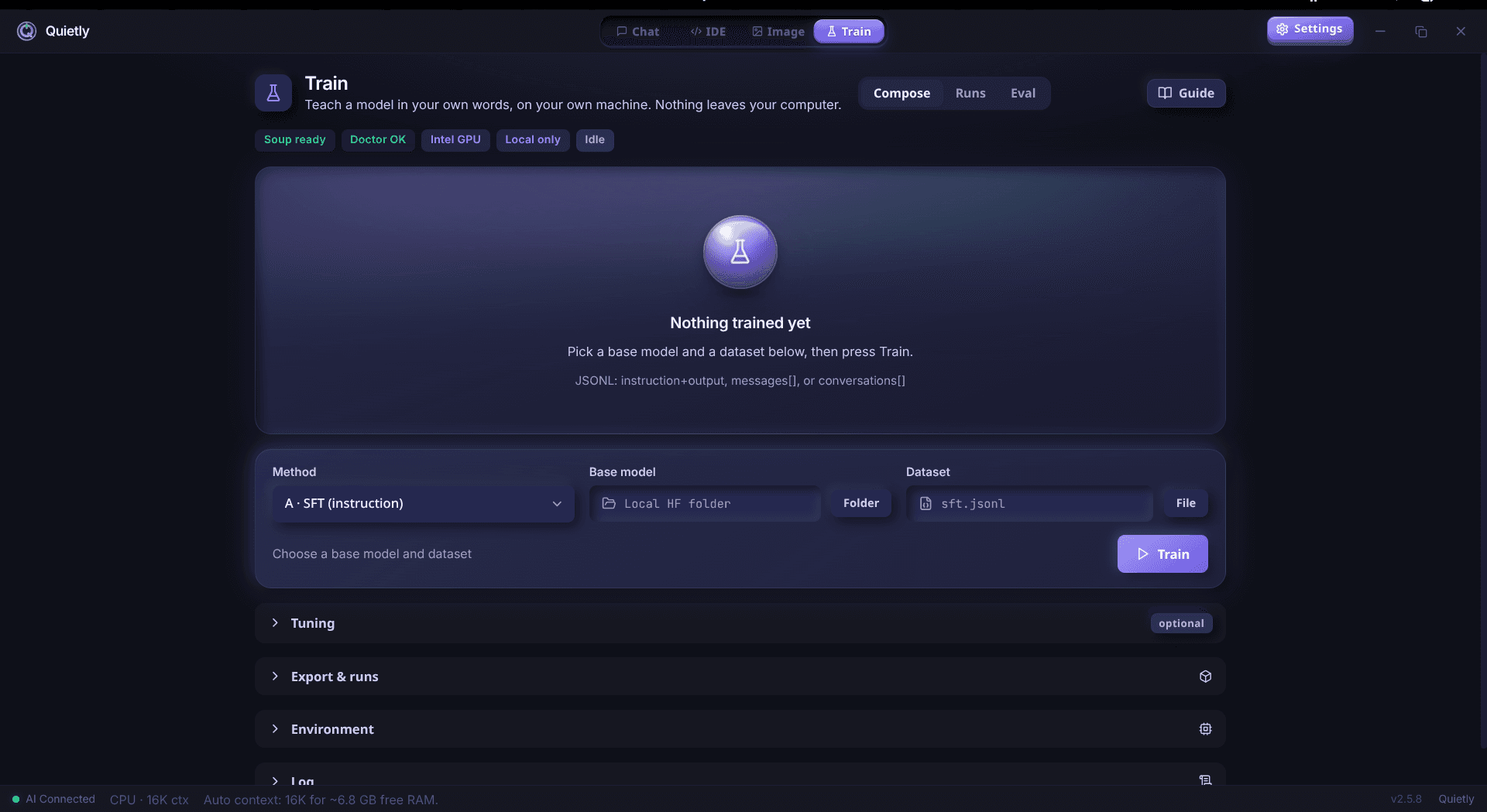
- Install Soup: a one-time setup of the training tools.
- Run Doctor: checks your GPU, drivers, and memory before you start.
- Pick a base model and dataset: the base must be a Hugging Face model folder (config.json plus safetensors). GGUF files are for running models and can’t be trained.
- Choose a method: “SFT (instruction)” for most coding use cases.
- Start Train: watch the step count, loss, and time remaining update live.
- Export GGUF: turn the result into a normal model file (q4_k_m by default).
- Use in Chat: load your new model in chat or the IDE with one click.
note
Your computer is busy while training
Training uses almost all of your GPU or CPU, so Quietly stops the chat engines during a run. Plan to train when you don’t need the AI for something else—overnight is ideal.
Other training methods (for later)
Methods available in the Train view.
| Method | Data you provide | Use it to… |
|---|---|---|
| SFT (instruction) | instruction + output, or messages | Teach tasks and style — start here |
| Continued pretraining | Plain text JSONL or .txt files | Soak up domain language and docs |
| DPO / SimPO / ORPO | prompt + chosen + rejected | Prefer good answers over bad ones |
| KTO | prompt + completion + label | Learn from simple thumbs up / down |
Step 4: Check that it actually got better
- Ask the held-back test questions to both the original and the fine-tuned model and compare.
- Watch for overfitting: if it repeats training answers word for word or gets worse at general questions, use fewer training steps or more varied data.
- Keep the base model: if a fine-tune disappoints, you simply switch back.
FAQ
Can I fine-tune an LLM on my own computer?
Yes. LoRA fine-tuning trains a small adapter on top of a 4-bit base model, which fits on consumer hardware. An NVIDIA GPU makes it practical; Macs and other GPUs can train small models on the CPU, more slowly.
How much data do I need to fine-tune on my code?
Start with a few hundred high-quality examples. Clean, correct, consistent examples matter far more than volume. You can add more once you see the first results.
Does Quietly create the training dataset for me?
No. You provide the JSONL file—for example instruction/output pairs or chat messages. This keeps you in control of exactly what the model learns and ensures no secrets slip in.
Can I fine-tune a GGUF model?
No. GGUF is a format for running models. Training needs the original Hugging Face model folder (config.json and safetensors). After training, Quietly exports your result to GGUF so you can chat with it.
Is fine-tuning better than RAG for my codebase?
They solve different problems. RAG (like Quietly’s Project Brain) helps the model look up your actual code. Fine-tuning changes how the model writes. Many teams use a rules file and RAG first, then fine-tune for style.
Related guides
Comparison
The Offline Cursor & GitHub Copilot Alternative: A Private AI IDE (2026)
Want Cursor- or Copilot-style AI coding without sending your code to the cloud? An honest look at what a private, offline AI IDE can do in 2026, where it still trails, and how Quietly fills the gap.
Awareness
How Much RAM Do I Need to Run an LLM Locally? (Simple 2026 Guide)
A simple, no-jargon guide to how much RAM you need to run a local LLM: the one formula to remember, a table for 8 GB to 64 GB machines, why context length eats memory, and how to check your own PC in one click.
Awareness
How to Run a 70B Model on a Small GPU with AirLLM (Honest 2026 Guide)
AirLLM lets 70B-class models like Llama 3.3 70B run on GPUs and PCs that could never hold them in memory. How layer streaming works, what speed and disk space to really expect, and how to set it up without the terminal.