When ChatGPT, Claude and Grok Went Down Together: Building an Offline AI Backup Plan (2026)
On September 3, 2026, Claude, ChatGPT, Codex and Grok failed at the same time—so switching providers didn’t help. What 2026’s outages taught us about “multi-AI” resilience, what downtime really costs, and a three-tier offline backup plan you can set up in an afternoon.
Awareness · 9 min
When ChatGPT, Claude and Grok Went Down Together
On September 3, 2026, Claude, ChatGPT, Codex and Grok failed at the same time—so switching providers didn’t help. What 2026’s outages taught us about “multi-AI” resilience, what downtime really costs, and a three-tier offline backup plan you can set up in an afternoon.
Definition
An offline AI backup is a local model and app on your own computer that you can switch to when cloud AI services are down, slow or rate-limited. It won’t match the biggest cloud models on every task, but it keeps routine work—explaining code, small edits, drafting, summarising—moving when the cloud stops.
Most teams have a backup for their code (git), their files (cloud sync) and their internet (a phone hotspot). Very few have a backup for the AI tools they now use all day.
2026 showed why that matters. Claude went down globally in March and again in August. Then on September 3, Claude, ChatGPT, Codex and Grok all failed within the same half hour.
The obvious plan—“if one AI is down, use another”—didn’t work that day. Here’s why, and what does.
2026’s big outages at a glance
Selected 2026 incidents, from public status pages and news reports.
| Date | What went down | Notable detail |
|---|---|---|
| Mar 2 | Claude web, apps and Claude Code; login worldwide | Started 11:49 UTC; the API kept working, but anyone using the apps or Claude Code was stuck |
| Aug 24 | Claude models across products | 55% of user reports were about Claude Code—developers felt it most |
| Sep 3 | Claude, ChatGPT, Codex and Grok together | About 30 minutes; traced to shared infrastructure (Cloudflare) rather than any one AI company |
None of these were long by internet standards. But they landed in the middle of working days, and the people hit hardest were the ones who had built their whole workflow around a single AI tool.
Why “just switch to another AI” failed
Paying for two AI services feels like redundancy. On September 3 it wasn’t, because the providers shared something underneath: the same content-delivery and security network in front of their websites and apps.
This is the uncomfortable truth about cloud backups. Different brands can share the same cloud, the same network provider, the same region—and the same bad day. Real redundancy means something that doesn’t depend on the internet at all.
note
Rate limits are outages too
You don’t need a global incident to be stuck. Hitting a usage cap at 4 p.m. on a deadline, or a “high demand” slowdown, has the same effect on your work. A local model has no cap.
What does 30 minutes of downtime actually cost?
It’s more than the 30 minutes. People lose their flow, switch to something else, and take a while to come back. Here’s a simple way to estimate it for your own team—the numbers below are an example, not a survey:
Example: a 10-person dev team. Replace the assumptions with your own.
| Item | Assumption | Cost |
|---|---|---|
| Direct time lost | 10 people × 30 min × $75/hour | $375 |
| Getting back into flow | 10 people × ~20 min extra | $250 |
| Per outage | ≈ $625 | |
| Per year | If it happens ~6 times (outages + rate-limit stalls) | ≈ $3,750 |
That’s a conservative number for a small team, and it ignores the worst case: an outage on launch day. A local backup costs a one-time setup and some disk space.
The three-tier offline backup plan
Pick the tier that matches how much you rely on AI.
| Tier | What you set up | Keeps working during an outage | Time to set up |
|---|---|---|---|
| 1. Minimum | One small local chat model (3–4B) on each laptop | Explanations, quick questions, drafting, summaries | 15 minutes |
| 2. Developer | A local coding model in your editor with project context | Code explanation, refactors, small features, reviews | An hour |
| 3. Team | Tier 2 on every machine, plus a written “outage mode” checklist and offline docs | Most day-to-day work, with planned hand-off back to cloud later | An afternoon |
Not sure which model fits your laptop? Our guides on RAM for local LLMs and on the best models for laptops without a GPU cover that in detail.
An “outage mode” checklist to keep on your desk
- Switch to your local model—don’t refresh the status page for 30 minutes.
- Shrink the task: ask for one function, one explanation, one summary at a time. Local models do best with focused prompts.
- Save the hard stuff (huge refactors, deep architecture questions) in a “for later” note to run on a cloud model when it’s back.
- Keep offline docs for your main language and framework downloaded in advance.
- Commit often—outages are when people lose half-finished work.
tip
Test your backup before you need it
Spend one hour a month working with only your local setup—Wi-Fi off. You’ll find the gaps (a missing model, an expired login, a tool that silently needs the internet) on a calm day instead of a bad one.
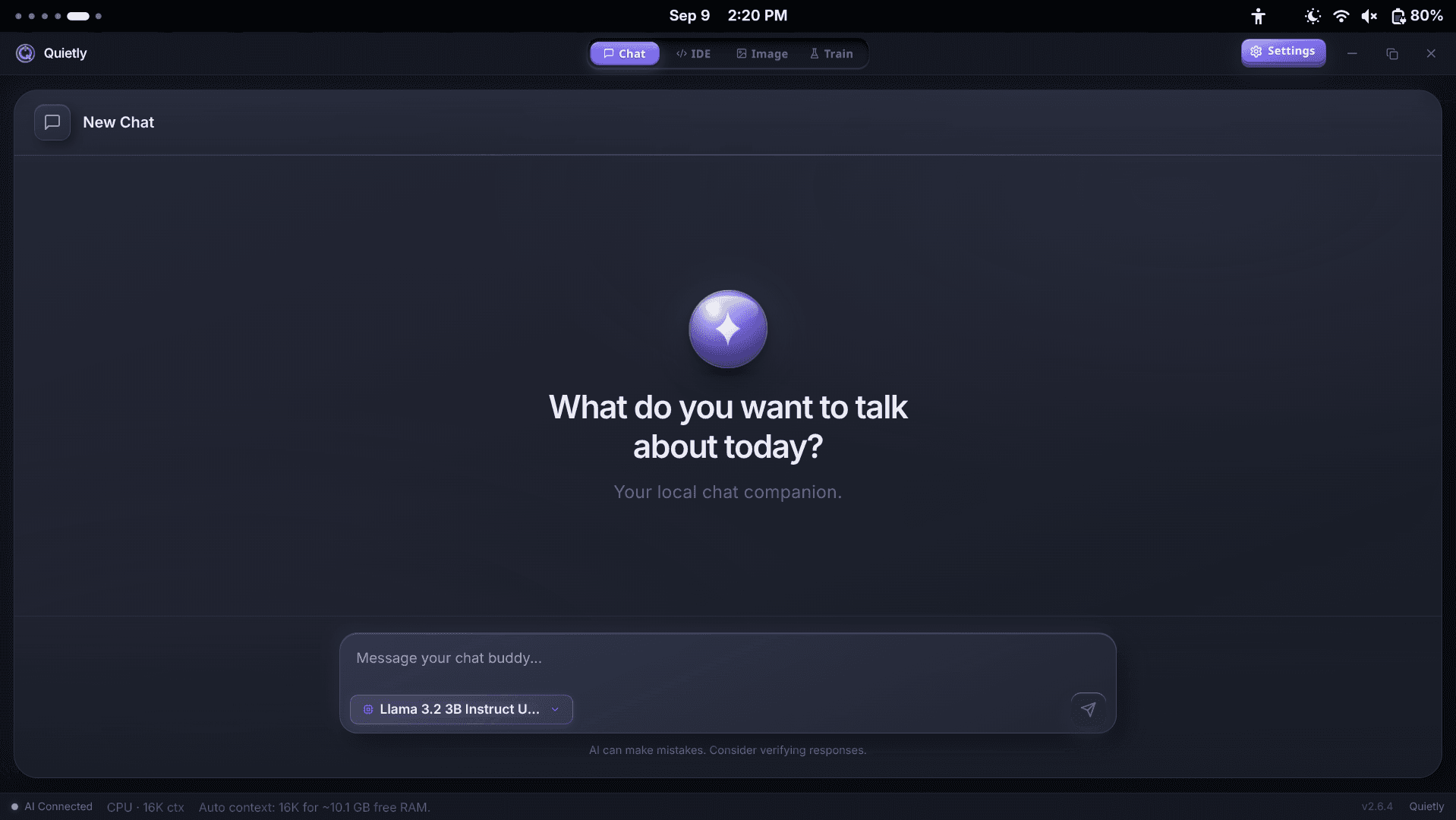
Using Quietly as your offline backup
Quietly was built to keep working with the network gone, which makes it a natural fallback even if you use cloud AI most of the time:
- Chat, the IDE agent, image generation and training all run on your machine once a model is downloaded.
- Your licence keeps working offline for 30 days between checks, so a long outage—or a long flight—won’t lock you out.
- Air-Gap Mode (Settings → Privacy) lets you rehearse a real outage: it blocks every non-localhost request so you can see exactly what still works.
- The status bar shows your context size and free RAM, so you know what your laptop can handle before you need it.
warning
Be realistic about the trade-off
A model that fits on a laptop is not as capable as the largest cloud models, especially for long, multi-step tasks. The goal of a backup isn’t to replace them—it’s to make sure an outage costs you minutes of convenience, not hours of work.
Where Quietly fits
FAQ
Why did ChatGPT, Claude and Grok go down at the same time?
On September 3, 2026, the shared cause was a problem at Cloudflare, an infrastructure provider in front of many websites and apps, rather than a fault at each AI company. It lasted about 30 minutes.
What can I use when ChatGPT or Claude is down?
A local AI app with a model already downloaded keeps working with no internet. It is best for explanations, small code changes, drafting and summarising. Set it up before you need it so you aren’t downloading gigabytes during an outage.
Is having two cloud AI subscriptions a good backup?
It helps when one company has a problem, but not when they share infrastructure that fails, as happened in September 2026. A local model is the only backup that doesn’t depend on the internet.
Will a local model be as good as Claude or GPT?
Not on the hardest tasks. Modern local models are good at focused work—one function, one question at a time—which is exactly what you need to keep moving during an outage.
Does Quietly work completely offline?
Yes, once the app and a model are downloaded. Chat, coding, image generation and training run on your machine, and the licence works offline for 30 days between checks.
Sources
Related guides
Awareness
Local AI on Linux: Install with AppImage, .deb, .rpm or on Arch (2026 Guide)
A practical guide to running local AI on Linux: which package to choose (AppImage, .deb, .rpm), how to install on Ubuntu, Fedora, and Arch, GPU drivers for NVIDIA and AMD, and fixes for common Wayland and blank-screen issues.
Awareness
“Bleeding Llama” Explained: Is Your Local AI Exposed to the Internet? (60-Second Check)
CVE-2026-7482 let anyone on the internet read memory from ~300,000 Ollama servers—prompts, system instructions and API keys included. What happened, why “local” didn’t mean “private”, and a one-minute check you can run on your own machine today.
Awareness
Is That Model File Safe? Pickle vs Safetensors vs GGUF, and How to Download AI Models Without Malware
Researchers have found 1,574 look-alike models on Hugging Face, and 2026 brought critical bugs triggered by poisoned GGUF files. Which model formats can carry code, how fake repos fool people, what a sha256 checksum does—and doesn’t—prove, and a six-point checklist before every download.